Construction intelligence platform

See what is really happening across your construction projects.

BuildSight AI turns site photos, drawings, schedules and inspections into a live, evidence-backed view of progress, risk and quality, so teams act on what is built, not on what is reported.

BuildSight · Atlas Data Center — Phase IILive demo · sample dataOpen full screen
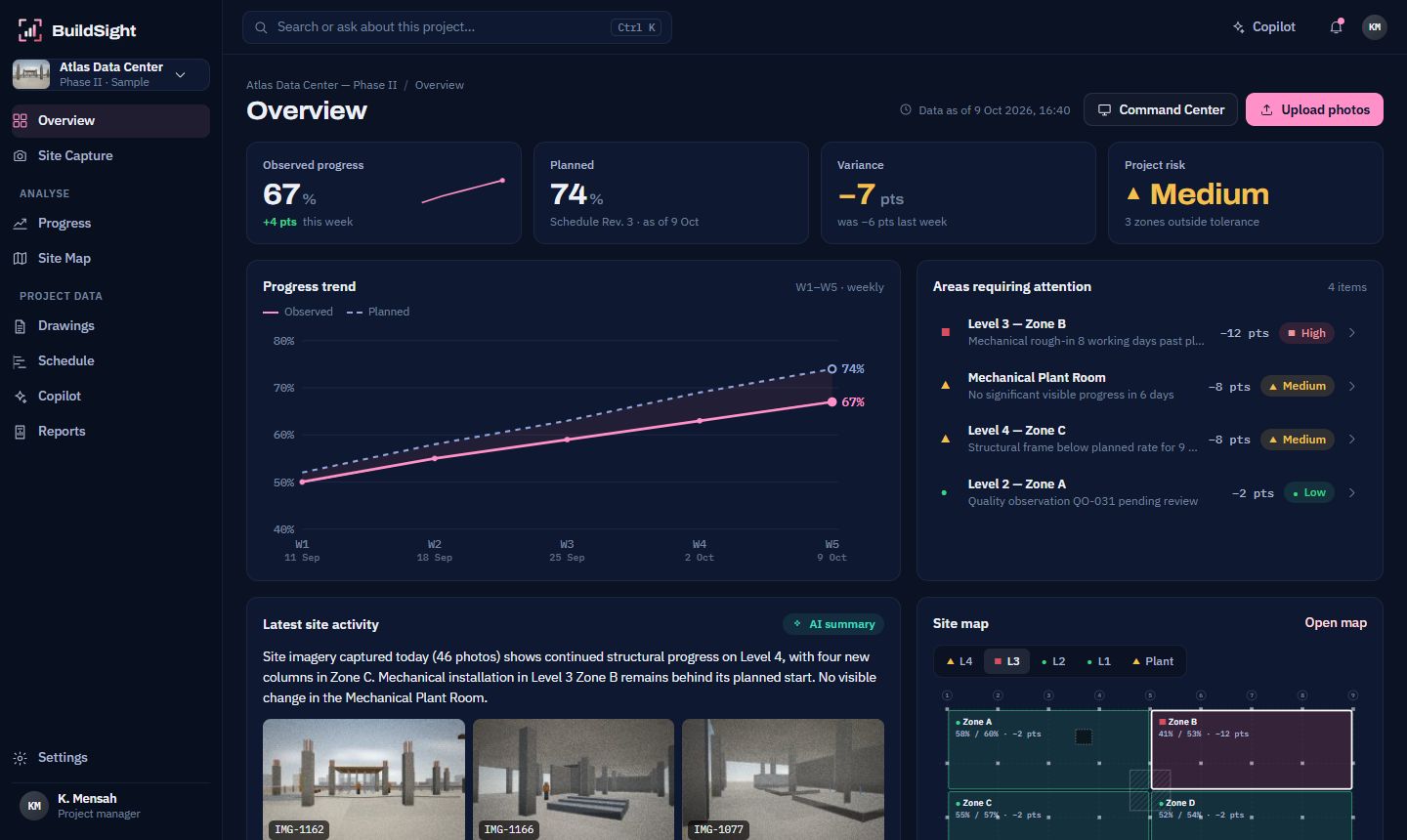
BuildSight overview of the Atlas Data Center sample project: 67% observed against 74% planned, variance minus 7 points, medium risk, with areas requiring attention and a site map.

This is the working MVP on a sample project. Click around, or open it full screen.

What BuildSight does

BuildSight AI is a construction-intelligence platform. Your teams photograph the site the way they already do, and BuildSight works out what has actually been built, compares it with the drawings and the schedule, and shows where the project is slipping.

It reads every photo before it says a word. Columns, formwork, blockwork, ductwork: each observation is placed on a building, level and zone, linked to the right drawing and schedule activity, and kept as evidence.

Owners, contractors and engineers stop piecing status together from spreadsheets and photo folders. They open one view of the project's physical reality, and ask it questions.

Product walkthrough · 1:33

Watch a site photo become a project decision.

A screen recording of the BuildSight MVP on the Atlas sample project: capture, AI analysis, inspection comparison, progress confirmation, schedule risk, Copilot and the weekly report.

The problem

Construction projects generate data everywhere. Intelligence stays fragmented.

Every week a project produces thousands of photos, revised drawings, schedule updates, inspection records and daily reports. Teams still piece them together by hand to answer a simple question: where are we, really?

BuildSight connects those signals into one project-intelligence layer, so the answer comes with its evidence.

  • Site photos2,418
  • Drawings186
  • Schedule412 activities
  • InspectionsQA / QC
  • RFIsopen items
  • Daily reportssite diary
BuildSight AIproject graph
  • Progress
  • Risk
  • Quality
  • Answers

Sample week on Atlas Data Center — Phase II: 2,418 photos · 186 drawings · 412 schedule activities · 3 open quality observations

How it works

Capture. Understand. Act.

  1. Teams photograph the site with any phone or upload a walkthrough video. Each batch is tagged to a building, level and zone.

  2. AI reads each image for columns, formwork, blockwork, ductwork, equipment and activity, with a confidence on every observation.

  3. BuildSight compares the photo with the previous inspection from the same viewpoint, the current drawings and the planned schedule.

  4. Progress gaps, stalled zones and potential quality issues are flagged, each with the photos that show it.

  5. Trends and the critical path show where delay is likely to spread next, using rules your team can read.

  6. Project managers confirm progress, ask Copilot follow-up questions and publish the weekly report in minutes.

Phone camera view of Level 4 Zone CLevel 4 — Zone C
12 photosUpload
9 Oct · 10:42Viewpoint L4-C NE corner · tagged on upload
  • Concrete columns × 17 96%
  • Slab formwork and props 91%
  • Blockwork wall 88%
Level 4 Zone C on 5 October
Mon 5 Oct51%
Level 4 Zone C on 9 October
Fri 9 Oct63%
Observed63%
Planned71%

Areas requiring attention

  • ■Level 3 — Zone BRough-in 8 days late−12
  • ▲Mechanical Plant RoomNo change in 6 days−8
  • ▲Level 4 — Zone CBelow planned rate−8
Why is Zone B behind schedule?

MEC-112 (mechanical rough-in, Level 3 Zone B) has not started, 8 working days after its planned start on 29 September. None of the 23 photos of that zone since then show ductwork or supports.12

✓Weekly report drafted · 5–9 Oct 2026

Core capabilities

One upload. Every answer about the site.

Every demo below runs on the same sample project. Try them.

Visual intelligence

Your site photos become measurable progress.

Drag across Monday's and Friday's inspection of Level 4 Zone C. BuildSight found four new columns, more blockwork and finished formwork, and noticed that mechanical work has not started.

  1. 14 new structural columns C14–C17
  2. 2Blockwork along grid 6 ≈18 m
  3. 3Formwork completed bay 4C-2
  4. 4Mechanical work not started
Observed63%
Planned71%
Variance−8 pts

Drag the handle, or use the arrow keys. Overlays show what changed.
Progress intelligence

Know whether reported progress matches physical progress.

ObservedPlanned

Drawing intelligence

Connect what's being built with what was designed.

  1. PhotoIMG-1162
  2. LocationBuilding A · Level 4 · Zone C
  3. ElementColumn C17
  4. DrawingS-204 Rev.5
  5. Specification03 30 00
  6. ScheduleSTR-043

BuildSight Copilot

Ask your project.

Copilot answers from this project's photos, drawings, schedule and observations, and attaches the evidence. When the data cannot answer a question, it says so.

  • Numbers come from the project record, never from the model
  • Every ID it mentions is checked before it is shown
  • Answers stay inside the data your role can see
Ask your own questions in a live demoRequest a demo

Quality intelligence

Surface potential issues earlier.

Concrete soffit on Level 2 Zone A with the potential defect boxed
Observation
QO-031 · Pending review
Location
Building A — Level 2, Zone A
AI observation
Potential surface defect identified in recently completed concrete area.
Evidence
IMG-1147 · 8 Oct
Confidence
82%
Action
Engineering review recommended.

BuildSight flags potential issues for professional review. It does not certify structural condition.

Project map

See risk where it is, not in a spreadsheet.

Technology

Five AI passes behind every upload.

BuildSight is more than a chatbot over PDFs. It sees the site, places what it sees in the project, and measures it against the plan, with rules a project manager can read.

  1. 01

    Reads the photo

    A vision pass records what is visible: elements, activity and condition, each with a confidence. Only what it can see.

  2. 02

    Places it in the project

    Each observation is linked to a building, level, zone, element, drawing and schedule activity in the project graph.

  3. 03

    Compares over time

    Captures from the same viewpoint are compared, so change between inspections becomes a measured difference.

  4. 04

    Scores progress and risk

    Weighted activity checklists turn changes into progress, and variance plus the critical path turns progress into risk.

  5. 05

    Explains with evidence

    Copilot answers and weekly reports cite the photos, drawings and activities behind every statement.

Private by default. Each organisation's data is isolated and encrypted, and never shared with other customers.

See the technology

Platform

Seven modules. One project record.

Explore the platform
  • Pilot

    BuildSight Vision

    Analyse site imagery: elements, activity and change between inspections.

  • Pilot

    BuildSight Progress

    Measure progress by zone from photos, confirmed by your team.

  • Pilot

    BuildSight Docs

    Turn drawing sets into a searchable register that knows the current revision.

  • Pilot

    BuildSight Copilot

    Ask questions of the whole project and get answers with evidence.

  • In development

    BuildSight Inspect

    Route potential quality observations into inspection and review.

  • In development

    BuildSight Predict

    Flag where delay is likely to spread before it reaches the critical path.

  • In development

    BuildSight Twin

    Navigate the project's intelligence spatially, floor by floor.

Who it's for

Built for everyone who needs the truth about progress.

  • Project owners

    Is the progress I'm paying for actually built?

    Verify progress independently, with photo evidence behind every number.

  • General contractors

    Where are we losing time across trades?

    See variance by zone, package and subcontractor, and the areas with no visible progress.

  • Project managers

    What needs my attention this week?

    A ranked list of problem areas and a weekly report drafted from confirmed data.

  • Engineers

    Which drawing applies to what I'm looking at?

    The current revision for any photographed element, and quality observations to review.

  • Construction executives

    Which projects need intervention?

    The same measures across every project, from portfolio down to a single photo.

Built for complex physical projects

  • Data centersMission-critical construction monitoring
  • Commercial constructionBuilding and development projects
  • Industrial projectsFactories, warehouses and production facilities
  • InfrastructureTransportation and civil projects
  • EnergyPower and energy infrastructure
  • Large residentialMulti-building development monitoring

The shift

Move from reporting progress to understanding it.

TodayWith BuildSight
Manual photo reviewAutomated comparison between inspections
Spreadsheet progress trackingProgress measured from site evidence
Drawings in separate foldersPhotos linked to the current drawing revision
Status scattered across reportsOne project-intelligence layer
Risks found at the monthly meetingEarly warnings from trends and the critical path
Weekly report written by handWeekly report drafted from confirmed data

Security

Your project data stays protected.

Enterprise buyers trust BuildSight with drawings and site imagery that matter. The platform is built for that from the first line of code.

Security details
  • EncryptionAt rest and in transit
  • Secure sign-inMulti-factor authentication
  • Role-based accessOwner to viewer, per project
  • Organisation isolationEnforced in the database
  • Audit trailSign-ins, uploads, exports
  • Retention controlsSet by your admins
  • Cloud-independentProduct logic above the infrastructure

Early access

Start with one project.

We are working with a small group of owners, contractors and engineering firms on early pilots.

  1. 1Talk

    A 30-minute call about your projects and how you report progress today.

  2. 2See it on your site

    A live demo on the sample project, then on a batch of your own photos.

  3. 3Pilot

    One project, agreed success measures and a weekly check-in.

FAQ

Questions teams ask first.

Can't find yours? Talk to us.

How does BuildSight measure progress from photos?

Each zone has a checklist built from its schedule activities, weighted by planned duration. BuildSight reads each photo, compares it with the previous capture from the same viewpoint, and suggests a percentage for each item. A project manager confirms the suggestion before it changes any reported figure.

Do we need drones, fixed cameras or special hardware?

No. The MVP works with photos and walkthrough videos from the phones your teams already carry. Fixed cameras, drones and an API are on the roadmap.

Does it replace our scheduling or project-management software?

No. BuildSight reads your schedule (Microsoft Project XML, Primavera P6 XER or CSV) and your drawing sets, and adds what the site actually shows. Your existing tools stay the system of record for planning.

How accurate is it, and who has the final say?

Every AI observation carries a confidence and its evidence. Low-confidence results go to a person, progress suggestions need confirmation, and quality findings are potential observations for professional review, never certifications.

What happens to our project data?

Your data belongs to your organisation. It is isolated from other customers, encrypted at rest and in transit, governed by roles you set, and deleted on request under your retention settings.

Which files can we bring?

Photos (JPG, HEIC, PNG), walkthrough video (MP4, MOV), drawing and specification PDFs, and schedules from Microsoft Project, Primavera P6 or CSV.

Where does BuildSight run?

On enterprise cloud infrastructure with encryption and isolation throughout. The application layer is cloud-independent by design, so infrastructure can follow your organisation's requirements as deployments grow.

Know what's built, not just what's reported.

See BuildSight on the sample project, then on your own site photos.